Miniwindows in MUSHclient - Dark blending modes
Written by Nick Gammon - July 2008. Updated September 2010.
On this page:
See also:
- Introduction
- Creating miniwindows
- Drawing shapes
- Drawing images
- Drawing text
- Hotspots
- Helpful graphics functions
Dark blending modes
See Blending images for a description of how to use the image blending function. On this page are illustrated the "darkening" modes.
| Base image (in miniwindow) | Blend image (mentioned in WindowBlendImage) |
|---|---|
 |
 |
Darken mode (5)
Each pixel is compared, the darker one is taken. White does not affect the result, black gives a black result.

This mode is commutative (base and blend layer can be swapped).
Multiply mode (6)
The pixel values are multiplied by each other and then divided by 255 (the maximum value that a pixel can have). This generally results in a darker image.
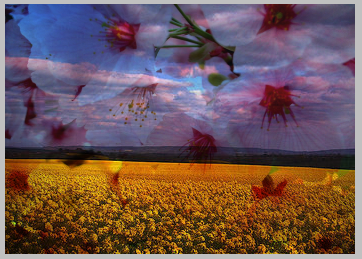
This mode is commutative (base and blend layer can be swapped).
Colour Burn mode (7)
Each pixel is divided by the inverse of the the other pixel. This generally results in a darker image, with some clipping taking place.

Linear Burn mode (8)
This is actually the same as Subtract mode, see below.
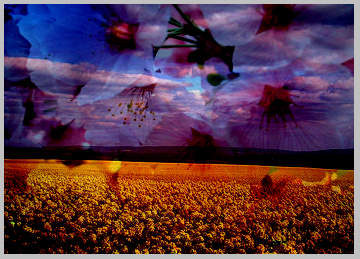
This mode is commutative (base and blend layer can be swapped).
Inverse Color Burn mode (9)
This is the same as Colour Burn mode, with the base and blend layers swapped.

Subtract mode (10)
The two layers are added together, and then 256 is subtracted. This is like the inverse of additive mode.

This mode is commutative (base and blend layer can be swapped).
Examples on this page
The examples on this page are taken from Fields of gold... by Spiralz, and Thanks to solea by jam343. These are licensed for royalty-free use under the Attribution 2.5 Generic License. They were obtained from the web site http://www.everystockphoto.com/.
Some ideas and descriptions were adapated from the Pegtop.net Blend Modes article.
Summary of the pages with the various mode groups:
- Normal, average, dissolve
- Darkening modes
- Lightening modes
- Soft/hard light modes
- Difference/logical modes
- Glow modes
- Colour copying
- Colour limiting
- Channel modes
- HSL modes
Other pages about miniwindows
- Introduction
- Creating miniwindows
- Drawing shapes
- Drawing images
- Drawing text
- Hotspots
- Helpful graphics functions
![[Home]](/images/home.gif)