Making a macro (function key)

Posted by Nick Gammon on Sat 04 Aug 2007 11:37 PM — 8 posts, 41,667 views.

Australia Forum Administrator #0

One of the advantages of using a modern client is to save typing. Let's say we are using the "task" system (described elsewhere in this forum) and often need to type "task available". Rather than doing that tediously every time we can make a macro so we just hit F4 and have it do that for us. First, Press Alt+Enter to open the world configuration dialog, and then click on "Macros" (on the left) to open the Macros configuration. Then, using the list box on the right, scroll down until you see F4, select that, and click Edit:
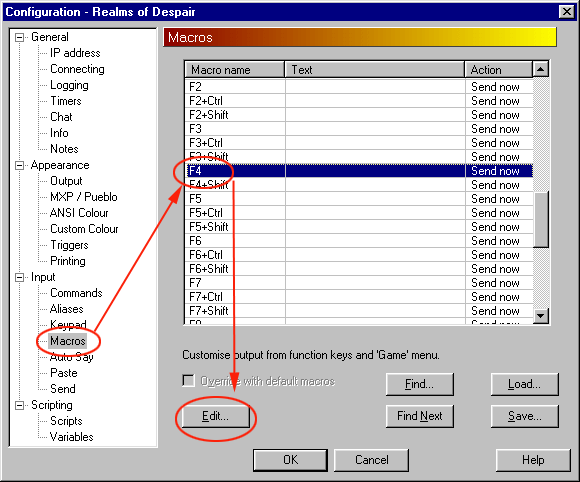
Macro configuration

We are now editing what is sent if you hit F4. Type in "task available" (or whatever you want to do), and click OK, and then OK again to close the world configuration:
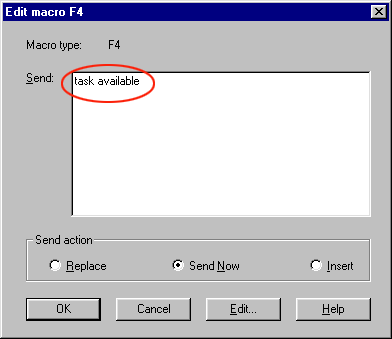
Edit a macro

Now I can hit F4 and it will send "task available" to the MUD:
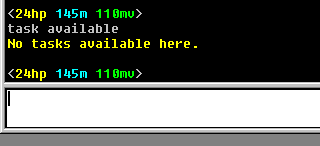
Testing the macro

Now you can go and set up further macros to save other typing. Don't forget to save your world file afterwards so your changes are not lost (Press Ctrl+S).

#1
Ive a question:

if you have the alias set up for targeting how would you tie that into a macro,say casting burn? or would you just use another alias as in the example here:


http://vimeo.com/80326272


with kick and backstab?


also: if I could get pointed in the right direction for adding a wait command to triggers that would be great


and thank you so much, everything here is a godsend for me
Amended on Tue 26 Nov 2013 03:43 AM by Nick Gammon
#2
well, you know I thought a bout it and i could just do the alias,but things like "burn", and "Fire-b" would still be too long for me...


would i set up an alias then have the macro input what i would type for the alias to work


EXAMPLE:

for a burn spell macro I would make an alias like this:


[Edit Alias] (x)
///////////////////////////////////////
--Alias: "burn"--

--Input: "cast burn @target"--


send to world, expanded, and enabled
///////////////////////////////////////

then the macro is this:


[Edit Macro F-2] (x)
/////////////////////////////////////////

--Macro Type: "F-2"--


--Send:"burn"--


send now
///////////////////////////////////////////


so when i hit f2 i burn who ive targeted, right?


(sorry for the weird formatting, have no idea how to write in script yet really, hope you understand)

#3
no, it just types in what i want the alias to input


(see example above: thats what i tried to input, works for "kill @target", but not this one)
USA Global Moderator #4
You'll want to use an AcceleratorTo for that.

See first the FAQ section on accelerators:
http://www.mushclient.com/forum/?id=7794#39

And then the documentation for AcceleratorTo (a special kind of accelerator that can send to script):
http://mushclient.com/scripts/doc.php?function=AcceleratorTo
#5
thank you, ill let you know how it works out


you guys are great
Amended on Mon 08 Oct 2012 02:26 AM by Gimpmaster
USA Global Moderator #6
Quote:
btw: you should come checkout ..., even if only for a day, need to try to get the populaces up...sorry if this is considered spamming

Please don't do that here. We have an entire section of the forum for server announcements.
#7
of course, forgive me...amending the message right now