Learning to script through MUSHClient

Posted by Soupy on Sun 17 Sep 2017 11:38 AM — 13 posts, 47,818 views.

#0
Hello,

I think this is a pretty basic question but it has me stuck. I'm experimenting with various triggers and scripts but not really anything productive yet. Right now, I am looking at:

http://www.gammon.com.au/forum/bbshowpost.php?bbsubject_id=8411


I have it functioning as described by the tutorial and that is great. Now, I am trying to figure out how to get the script out of the trigger contents and into my world.lua file. As a start, I'm just trying to move the initial trigger portion over to a file:

Quote:
killed_mobs = killed_mobs or {} -- make mobs table

mob_name = "%1" -- this mob's name (first wildcard)

-- add this mob if first time

killed_mobs [mob_name] = killed_mobs [mob_name] or { count = 0 }

-- add 1 to count of mobs
killed_mobs [mob_name].count = killed_mobs [mob_name].count + 1

-- remember when we last killed it
killed_mobs [mob_name].last_time = os.time ()


When I pull it out of the trigger contents and copy and paste it into a world.lua file, it fails to compile with the following message:

Quote:
Error number: 0
Event: Run-time error
Description: [string "Script file"]:5: attempt to index field '?' (a nil value)

stack traceback:

[string "Script file"]:5: in main chunk
Called by: Immediate execution


I think that this is referring to the first time [mob_name] is referenced and it would make sense that it is nil when I initially load the script. I just have no idea how to fix it. Any help would be appreciated, even if you could just point me at a post where someone works through this challenge.


Thanks,
Soupy
Australia Forum Administrator #1
When using a script file things are done slightly differently. In particular the wildcards are passed as a function argument. The typical trigger function declaration is:


function myTriggerHandler (name, line, wildcards, styles)

-- your code here

end -- myTriggerHandler


Thus in your case it would be:


function myTriggerHandler (name, line, wildcards, styles)

  killed_mobs = killed_mobs or {} -- make mobs table

  mob_name = wildcards [1] -- this mob's name (first wildcard)

  -- add this mob if first time

  killed_mobs [mob_name] = killed_mobs [mob_name] or { count = 0 }

  -- add 1 to count of mobs
  killed_mobs [mob_name].count = killed_mobs [mob_name].count + 1

  -- remember when we last killed it
  killed_mobs [mob_name].last_time = os.time ()

end -- myTriggerHandler


Now the wildcards are passed down as a table (3rd argument) which you can index into like normal Lua tables.
Amended on Mon 18 Sep 2017 05:09 AM by Nick Gammon
#2
Thanks!

This has solved the errors that happened upon loading the script. Now, it appears that if I keep the trigger content fields blank that the trigger matches--I have it set to color the triggering message yellow and underline it--but nothing happens.

The UI prompts me to send '%0' but when I do that I get the following error...

Quote:
Error number: 0
Event: Compile error
Description: [string "Trigger: "]:1: unfinished string near '<eof>'
Called by: Immediate execution


I feel like I'm pretty close, I'm just missing the piece that bridges from the trigger as configured in the UI with the function in my script file.

Is it possible to just write out the trigger in the script file itself and have it call the function there? Or is there some other best practice that makes this easy?
USA Global Moderator #3
Quote:
The UI prompts me

Which UI?
#4
The Mushclient UI in the trigger setup. Specifically when I click 'Ok' to save the trigger settings with nothing in the 'Send' field.
USA Global Moderator #5
I think I need to see what it looks like.
Australia Forum Administrator #6
If you do "send to script" then the UI wants you to send something, and thus having a blank send box is not OK.

If you change it to "send to world" that message will go away.

If that doesn't solve it, show the trigger:

Template:copying
For advice on how to copy aliases, timers or triggers from within MUSHclient, and paste them into a forum message, please see Copying XML.
#7
This is the trigger that I am attempting to use for the script... http://www.gammon.com.au/forum/bbshowpost.php?bbsubject_id=8411


Where the triggering message is 'You killed *!'

Since I have moved MyTriggerHandler into the script file I don't know what to put in the text file at all.

Is there a file that explains how I pass in the arguments in the body of a trigger?
USA Global Moderator #8
Quote:
Is there a file that explains how I pass in the arguments in the body of a trigger?


https://www.gammon.com.au/scripts/doc.php?general=triggers has a section called "Trigger scripts" that may be helpful.
Amended on Sun 15 Oct 2017 02:56 PM by Fiendish
#9
Thank you, that is where I have been looking so it is good to know I am on the right track. I think I need some help actually connecting the dots here though. If my trigger is...


Quote:
<triggers>
<trigger
custom_colour="2"
enabled="y"
match="You killed *!"
sequence="100"
lowercase_wildcard="y"
>
<send></send>
</trigger>
</triggers>


And my handler, kept in the script file, is..

Quote:
function myTriggerHandler (name, line, wildcards, styles)

killed_mobs = killed_mobs or {} -- make mobs table

mob_name = wildcards [1] -- this mob's name (first wildcard)

-- add this mob if first time

killed_mobs [mob_name] = killed_mobs [mob_name] or { count = 0 }

-- add 1 to count of mobs
killed_mobs [mob_name].count = killed_mobs [mob_name].count + 1

-- remember when we last killed it
killed_mobs [mob_name].last_time = os.time ()

end -- myTriggerHandler


What do I need to put in the <send> </send> field to have that particular trigger invoke myTriggerHandler with the appropriate arguments? Is that even how it works?
USA Global Moderator #10

<trigger
custom_colour="2"
enabled="y"
match="You killed *!"
sequence="100"
lowercase_wildcard="y"
script="myTriggerHandler"
send_to="12"
></trigger>
Amended on Sun 15 Oct 2017 06:39 PM by Fiendish
Australia Forum Administrator #11
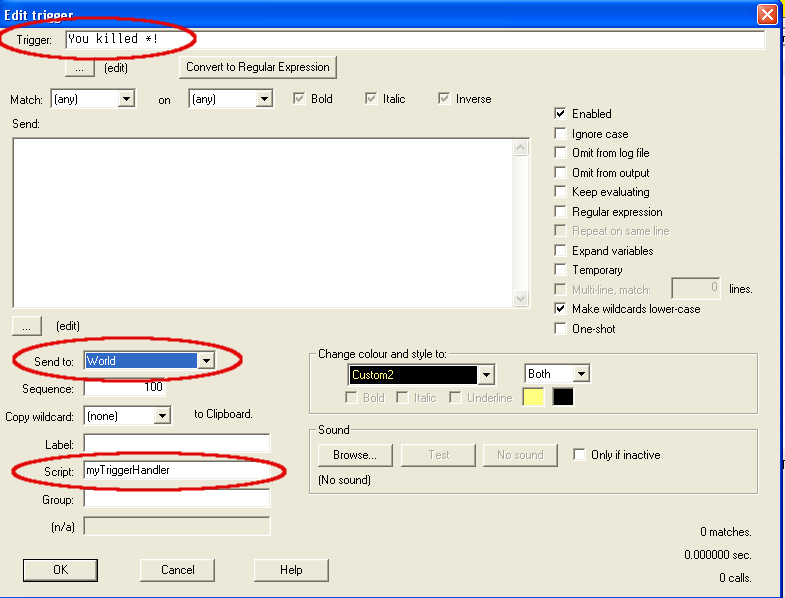
See this screenshot:


  • What you want to match on goes in the Trigger box
  • Send to World (the default)
  • If there is a function name in the Script box then that function is automatically called with the default arguments (name, line, wildcards, styles). This function needs to be in the world script file.


You don't need to do anything else to get your script function called.

There is a post explaining what happens when a line of text arrives from the MUD:

http://www.gammon.com.au/forum/?id=6554

If you put stuff in the "send" box then that is sent to the MUD, in addition to the script being called. You can also colour output, log it, etc. The post above explains the exact order in which these things happen.
Amended on Sun 15 Oct 2017 08:33 PM by Nick Gammon
#12
IT WORKS! Thank you!