I'm a long time MUSHclient user but have generally stuck to one mud. Recently I've been trying to use the chat plugin in Medievia (which works just fine in the other mud I play). However, somehow MUSH won't recognize the chat commands. They go straight to Medievia and the mud attempts to execute them as in-game commands.
I'm not sure if I'm just missing some setting. I have the chat plugin enabled in the Medievia world. I'm using MUSH 4.40. Any suggestions or questions are welcome!
I had:
<plugin
name="Chat"
author="Nick Gammon"
id="753ba7e011f3c8943a885f18"
language="VBscript"
purpose="Support for chat feature"
date_written="2003-04-13 14:32:22"
date_modified="2003-05-01 09:55"
requires="3.37"
version="1.3"
>
I imported lua_chat and enabled it (in Plugins, it says Enabled - Yes). I now have this one:
<plugin
name="Chat"
author="Nick Gammon"
id="03ca99c4e98d2a3e6d655c7d"
language="Lua"
purpose="Support for chat feature"
date_written="2005-12-18 07:32:00"
date_modified="2005-12-21 13:26:00"
requires="3.72"
version="1.0"
>
Still no results, here's a log:
[sfilmpqvw] <714/714hp 849/849m 610/610mv 100br 0xp -r>
chat:help
Thou must be confused.
[sfilmpqvw] <714/714hp 849/849m 610/610mv 100br 0xp -r>
#chat call
Thou must be confused.
[sfilmpqvw] <714/714hp 849/849m 610/610mv 100br 0xp -r>
#chats
Thou must be confused.
Sorry to be a pain, I just really want this to work :/
Ack! I had aliases disabled thinking something from there might be interfering! It works now, thank you :)
Now I'm having trouble chatting the password to the server. I know it's right since it works from another client.
Calling chat server at etc port etc
Session established to etc.
Chat session accepted, remote server: "wrath"
You have 15 seconds to chat your password to me.
#chat wrath mypass
You chat to wrath, 'mypass'
Incorrect...
Chat session to wrath closed.
I connected through MudMaster and chatted the password, I could notice it had single quote marks as well before it crashed (seems to happen just about every time I try to run it). Now I need to wait until tomorrow to be forced to authenticate again. I'll make another post copy/pasting then.
<CHAT> Connection to wrath at rixak.com:1212 accepted.
You have 15 seconds to chat your password to me.
/chat wrath mypass
You chat to wrath, 'mypass'
Welcome to MMChat by Dirocus
Chat to the server 'help' for usage information
MMChat by Dirocus. Version:4.3.2
[wrath] septienna Has Joined channel Main (Connect:Password Auth)
Ah, so because the server is being hosted on a MudMaster and its chat I can connect through that but having trouble with MUSH. Blech. Is there any way I can check what you mentioned?
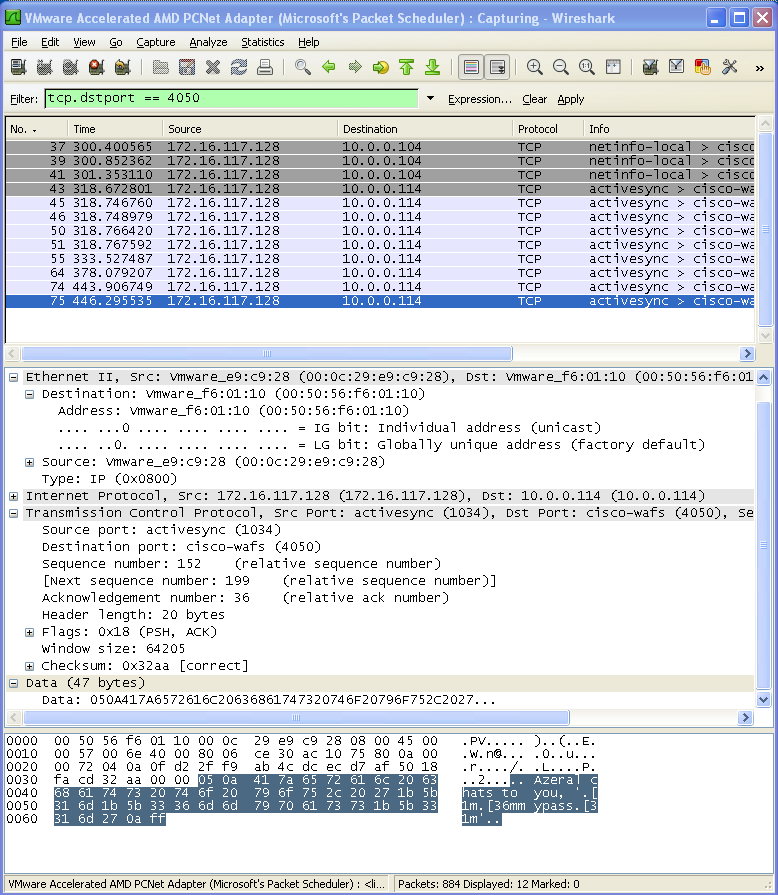
Assuming you are using the default chat port of 4050, enter this into the Filter line:
tcp.dstport == 4050
Click the Apply button next to it (see screenshot in next post). That should limit what would otherwise be a lot of data to things you send to port 4050 somewhere.
On the Capture menu, click Interfaces, choose the one that looks like it is connected to the Internet (if there are more than one) and click the Start button.
Fire up MudMaster and connect to the chat session. You should start to see stuff scroll by in the WireShark window.
Once you get asked for your password, enter it as normal.
Before doing anything else, check the Wireshark window. The last (or maybe second or third last line) should be the packet with your password in it.
Find the one where it says "Aduial chats to you, 'mypass'" (there will be extra stuff there which is the colour codes).
In the middle part of the screen (see screenshot) click on the Data line, which will highlight the data part at the bottom as in the screenshot.
Type into a forum message exactly what you see on the RH side (the text side), changing your password only. eg. For me it would be:
.. Azeral chats to you, '.[1m.36mmypass.[31m'..
Where "mypass" replaces the actual password.
The parts about [1m.36m tells me the colour codes it is sending.
Blank out the hex codes on the left (on Imageshack), you can work out your password from that. I've done it to your posting. It might be wise to change your password now.
Yes, that helped. Well it seems there were *no* colour codes. lol
This alias should solve your problems:
<aliases>
  <alias
   match="chatpass"
   enabled="y"
   send_to="12"
   sequence="100"
  >
  <send>
ChatMessage(ChatGetID ("wrath"),   -- who to
       5,   -- personal message
        "septienna chats to you, 'mypass'" ..   -- the message
       string.char (10)   -- newline
       )
Note "password sent"
</send>
  </alias>
</aliases>
For advice on how to copy the above, and paste it into MUSHclient, please see Pasting XML.
It sends the password (obviously you change it between the quotes (note a single quote followed by a double-quote there)), without colour codes.
So connect to the chat server, and instead of chatting your password type "chatpass" which will invoke this alias, and it will send the password without the colour codes. I tested it with Wireshark, and the codes look exactly the same as what you posted, so the server *should* accept it.
Works like a charm!
Thank you for your time and help! I have yet to receive better tech support for any product I've used than what you gave me here :) Yet another reason to continue using MUSH for all my mudding needs!