MUSHclient on Linux - Adding plugin crashes client

Posted by Darwin on Thu 07 Aug 2008 04:03 AM — 9 posts, 30,753 views.

USA #0
I've been happily scripting away creating miniwindows with status bars, compass, score, equipment lists, etc... All of this was coded within the script file in Lua and works like a charm.

However, I cam across a problem when I started to make hotspots for the compass to allow players to click the words and go in that direction. After fiddling with it for a while without luck, I realized that I would have to put these mouse functions in a plugin file so they would work.

I used the plugin wizard and created the plugin with no problems. I then went to add the plugin to my world settings and upon doing so, MUSHclient crashed.

Is this a known issue with running MUSHclient in Linux? Is there some kind of workaround I can use to keep MUSHclient from crashing?

I was looking for a way to edit the MCL file and manually add the plugin to it that way, but I couldn't find any documentation on the format of that particular part of the file.
Australia Forum Administrator #1
Are you using version 4.34 or version 4.35?

To add the plugin manually edit the .mcl file and add lines like this to the end of the world file:


<include name="plugin_name.xml" plugin="y" />

</muclient>


In other words, just before the </muclient> line.

There is no known issue about Linux right now, however there have been reports of the notepad crashing it.

Does this happen to any plugin, or one using the new miniwindows?

I suggest you upgrade Wine if possible. The latest stable version is now 1.0, if you are using a version below that you might want to consider upgrading.


Amended on Thu 07 Aug 2008 10:27 PM by Nick Gammon
USA #2
I'm using WINE 1.1.2, MUSHclient 4.35 and it seems to happen with any plugin. It's been that way for a while from what I can remember from trying to use plugins.

I added the line to the MCL file but it crashed when I tried to load that file. When it crashes, it doesn't give an error message or anything, the program is completely, and immediately, shut down.
Australia Forum Administrator #3

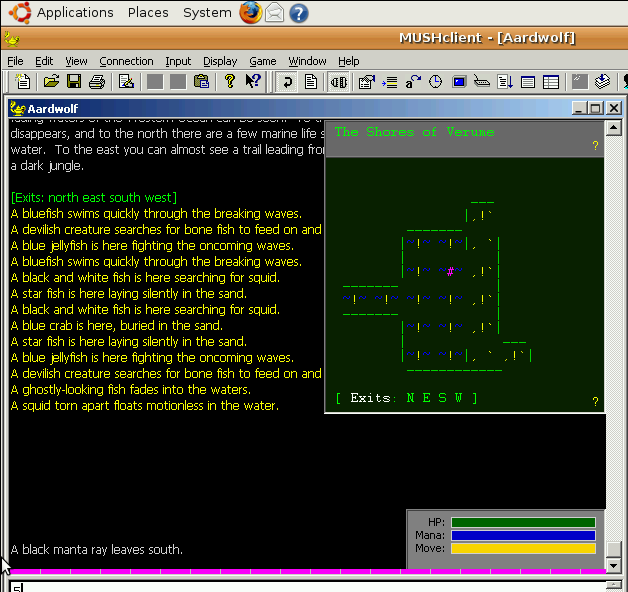
I just tested under Ubuntu (Heron), with the latest MUSHclient (4.35). You can see that the miniwindows and plugins work fine - there are about 3 visible. I was using wine-1.0-rc2.

Amended on Thu 07 Aug 2008 10:33 PM by Nick Gammon
USA #4
Interesting. I assume you did nothing special in order to load the plugins. Which Windows version does your WINE emulate to run MUSHclient? Perhaps that has some effect on it.
Australia Forum Administrator #5
I had it at the default, which happened to be XP.

I just loaded the plugins through the File -> Plugins.
USA #6
Ok, that solves it. It doesn't like to run in WinXP or Win2k but will work fine with plugins in Win98.

Good news is that I got it to load the plugin without crashing, however, the functionality that the plugin is supposed to provide isn't quite working yet.
USA #7
By the way, Nick, how did you take a screen cap and capture the cursor in it as well? I've been trying various things and the cursor keeps getting removed from the image.
Australia Forum Administrator #8
I am actually doing development on a (Intel) Mac running OS/X.

Because it is Intel, I can run Parallels with Windows XP as a "guest" operating system - it is still very fast. I also run Windows 98 as another guest operating system, for checking the latest stuff still works, and Ubuntu as another guest operating system.

This is handy for checking out bug reports on various operating systems without having to have lots of PCs hanging around with different OSes installed.

I do screen captures using the Mac screen capture software, and the guest operating system doesn't know I am doing that, so it doesn't hide the mouse pointer.