Accessing COM objects from Lua

Posted by Nick Gammon on Thu 27 Oct 2005 12:55 AM — 38 posts, 183,559 views.

Australia Forum Administrator #0
Although Lua is not implemented using the COM (Component Object Model) interface, sometimes it is useful to be able to use COM from within your scripts.

[EDIT] (September 2010) The module luacom will let you access COM objects. This is now built into version 4.60 onwards of MUSHclient. Instead of following the instructions below about downloading luacom, simply do this:


require "luacom"


This is possible if you download luacom from LuaForge, and use it in your Lua scripts.

I obtained it from:


http://luaforge.net/


Specifically this section:


http://luaforge.net/projects/luacom/


For this demonstration I only needed the file luacom-1.3-bin.tgz, although the file luacom-1.3-doc.pdf is also useful, being the documentation.

I extracted the archive and got the file luacom-lua5-1.3.dll which I placed in the same directory as the MUSHclient executable.

Then, running the following invoked the Microsoft Calendar program:


-- load luacom
assert (loadlib ("luacom-lua5-1.3.dll","luacom_openlib")) ()

-- Instantiate a Microsoft(R) Calendar Object
calendar = luacom.CreateObject("MSCAL.Calendar")

-- Error check
if calendar == nil then
  error ("Error creating object")
end

-- Method call
calendar:AboutBox()

-- Property Get
current_day = calendar.Day

-- Property Put
calendar.Month = calendar.Month + 1

print(current_day)
print(calendar.Month)

[EDIT] Updated example, using MUSHclient 4.60 onwards:


require "luacom"

-- Instantiate a Microsoft(R) Calendar Object
calendar = luacom.CreateObject("MSCAL.Calendar")

-- Error check
if calendar == nil then
  error ("Error creating object")
end

-- Method call
calendar:AboutBox()

-- Property Get
current_day = calendar.Day

-- Property Put
calendar.Month = calendar.Month + 1

print(current_day)
print(calendar.Month)
Amended on Fri 10 Sep 2010 10:41 PM by Nick Gammon
Australia Forum Administrator #1
The method described above does not seem to work with recent versions of MUSHclient that use the lua50.dll, because the earlier LuaCom implementations required different DLLs.

The latest download from their site works with slightly different code. This time I will use the SAPI object to "speak" something:


assert (loadlib ("luacom.dll","luaopen_luacom")) ()

-- Instantiate a SAPI voice obejct
talk = assert (luacom.CreateObject ("SAPI.SpVoice"), "cannot open SAPI")

-- Method call
talk:Speak ("hi there")


The link I used to download the luacom.dll was:


http://luaforge.net/frs/download.php/922/luacom-1.3-luabinaries-bin.zip


[EDIT] (September 2010) Updated example using MUSHclient 4.60 onwards:


require "luacom"

-- Instantiate a SAPI voice obejct
talk = assert (luacom.CreateObject ("SAPI.SpVoice"), "cannot open SAPI")

-- Method call
talk:Speak ("hi there")

Amended on Fri 10 Sep 2010 10:43 PM by Nick Gammon
Australia Forum Administrator #2
For more recent versions of MUSHclient (3.80 onwards) you need to use package.loadlib, like this:


assert (package.loadlib ("luacom.dll","luacom_open")) ()


Also, the version of luacom that has been compiled for Lua 5.1 is available here:

http://www.gammon.com.au/files/mushclient/lua5.1_extras/luacom.zip


See this thread for more discussion:

http://www.gammon.com.au/forum/bbshowpost.php?id=6593
Australia Forum Administrator #3
LuaCOM is now included in version 4.60 onwards of MUSHclient. So you can just use it without downloading any files. For example:


-- load Lua COM
require "luacom"
  
-- Instantiate a SAPI voice object
talk = assert (luacom.CreateObject ("SAPI.SpVoice"), "cannot open SAPI")
  
-- Method call
talk:Speak ("SAPI installed and is ready.", 1)


[EDIT] Amended so you just need to require "luacom", which is now built into the MUSHclient executable.
Amended on Thu 02 Sep 2010 08:11 AM by Nick Gammon
USA #4
Might I suggest adding a wrapper script to the lua/ directory, so you can just do require("com")?
Australia Forum Administrator #5
What would that look like?
Australia Forum Administrator #6
You mean, com.lua that has this in it?


-- load Lua COM
assert (package.loadlib ("luacom.dll", "luacom_open")) ()
return luacom

Amended on Wed 01 Sep 2010 06:03 AM by Nick Gammon
USA #7
Nick Gammon said:
You mean, com.lua that has this in it?


-- load Lua COM
assert (package.loadlib ("luacom.dll", "luacom_open")) ()


Yeah, pretty much. :)
Australia Forum Administrator #8
OK, good idea. Added com.lua to the distribution.
USA #9
Our Illustrious Leader Nick said:

Amended so you just need to require "com" rather than use the rather convoluted package.loadlib.


assert (package.loadlib ("luacom.dll", "luacom_open")) ()


Is the syntax for Lua 4.0. In Lua 5.1, require does this for you.


require "luacom"


Is sufficient as long as "Allow DLLs to be loaded" is checked, and luacom.dll is in the current directory or the path specified by the LUA_CPATH environment variable.

Amended on Wed 01 Sep 2010 06:24 AM by WillFa
USA #10
That doesn't work for me. Here's the error that require("luacom") produces:

Run-time error
Plugin: TTS_jFW_Lua (called from world: Soludra - Achaea)
Immediate execution
error loading module 'luacom' from file 'C:\Users\Jonathan\Documents\MUSHclient\worlds\plugins\TTS_JFW.plugin\libraries\luacom.dll':
        The specified procedure could not be found.

stack traceback:
        [C]: ?
        [C]: in function 'require'
        ...lient\worlds\plugins\TTS_JFW.plugin\scripts\main.lua:4: in main chunk
        [C]: in function 'require'
        [string "Plugin"]:41: in main chunk
Amended on Wed 01 Sep 2010 06:41 AM by Twisol
USA #11
The problem is that the Lua 5.1 entry-point format is luaopen_<libname>, whereas the luacom.dll file specifies luacom_open.
Australia Forum Administrator #12
Actually it doesn't, although I tried it because I recall you said something about that before.


Run-time error
World: SmaugFUSS
Immediate execution
error loading module 'luacom' from file '.\luacom.dll':
        The specified procedure could not be found.

stack traceback:
        [C]: ?
        [C]: in function 'require'
        [string "Command line"]:1: in main chunk


The entry point is wrong for the automatic require to work.
USA #13
Odd.


print(package.cpath) ->
C:\Lua\5.1\clibs\?.dll;


Timestamp of C:\Lua\5.1\clibs\luacom.dll:

5/16/2008 1:27:32


require "luacom"
print (luacom)
table: 04D641B0

tprint(luacom) ->

"FillTypeLib"=function: 04D40FC8
"addConnection"=function: 04D654E8
"Connect"=function: 04D65920
"GetCurrentDirectory"=function: 048A1AF8
"ExportConstants"=function: 04D368E8
"UnRegisterObject"=function: 04D66488
"NewLibrary"=function: 04D41568
"ProgIDfromCLSID"=function: 04D65588
"RegisterObject"=function: 04D66438
"RevokeObject"=function: 04D60678
"NewObject"=function: 04D65FB0
"ExposeObject"=function: 04D66000
"DetectAutomation"=function: 04D0B730
"CreateObject"=function: 04D64188
"ViewTypeLib"=function: 04D43CA0
"CLSIDfromProgID"=function: 04D653F8
"RoundTrip"=function: 04D10190
"NewControl"=function: 04D65FD8
"StartMessageLoop"=function: 04D0C928
"FillTypeInfo"=function: 04D38EB8
"_copyFields"=function: 04D3BB90
"DumpTypeInfo"=function: 04D66898
"GetIUnknown"=function: 04D664B0
"GetType"=function: 04D35178
"LoadTypeLibrary"=function: 04D66C08
"pairs"=function: 04D363E8
"CreateInprocObject"=function: 04D3B758
"ImplInterfaceFromTypelib"=function: 04D654C0
"CreateLuaCOM"=function: 04D644D0
"EndLog"=function: 04D61F28
"releaseConnection"=function: 04D656A0
"config":
  "__ENUMERATOR_LUACOM_TYPE":
    "__index"=function: 0507B8A0
    "type"="__ENUMERATOR_LUACOM_TYPE"
  "__ENUMERATOR_POINTER_LUACOM_TYPE":
    "__gc"=function: 0507B648
    "type"="__ENUMERATOR_POINTER_LUACOM_TYPE"
  "IConnectionPoint":
    "__index"=function: 0507AE78
    "type"="IConnectionPoint"
  "LuaCOM":
    "__index"=function: 05077110
    "type"="LuaCOM"
    "__newindex"=function: 05077160
    "__call"=function: 05078308
  "abort_on_API_error"=false
  "ITypeInfo":
    "type"="ITypeInfo"
    "__index"=function: 0507B670
    "__newindex"=function: 0507C0E8
  "ITypeInfo_pointer":
    "__gc"=function: 0507A4A0
    "type"="ITypeInfo_pointer"
  "abort_on_error"=true
  "__luacom_instances_cache":
  "ITypeLib_pointer":
    "__gc"=function: 0507BA30
    "type"="ITypeLib_pointer"
  "LuaCOM_UDTAG":
    "__gc"=function: 0507A8D8
    "type"="LuaCOM_UDTAG"
  "ITypeLib":
    "type"="ITypeLib"
    "__index"=function: 05079618
    "__newindex"=function: 0507B0F8
  "IUnknown":
    "type"="IUnknown"
    "__gc"=function: 0507AEA0
    "__eq"=function: 0507ACE8
"ShowHelp"=function: 04D65948
"ImplInterface"=function: 04D65470
"DumpTypeLib"=function: 04D43C00
"GetObject"=function: 04D64160
"CreateLocalObject"=function: 04D3AC40
"ImportIUnknown"=function: 04D670B8
"isMember"=function: 04D65538
"GetTypeInfo"=function: 04D66910
"StartLog"=function: 04D66550
"GetEnumerator"=function: 04D66AC8


Perhaps you have an old dll on your webserver?
Australia Forum Administrator #14
WillFa said:

Odd.


print(package.cpath) ->
C:\Lua\5.1\clibs\?.dll;

Perhaps you have an old dll on your webserver?


Old is not the word.

In any case, where did this file you have on your C drive come from, exactly? The link, I mean.
USA #15
http://code.google.com/p/luaforwindows/
Australia Forum Administrator #16
Oh. Wow.

A 212 Kb download, which is the entire Lua source, has morphed into a 19.6 Mb set of utilities.

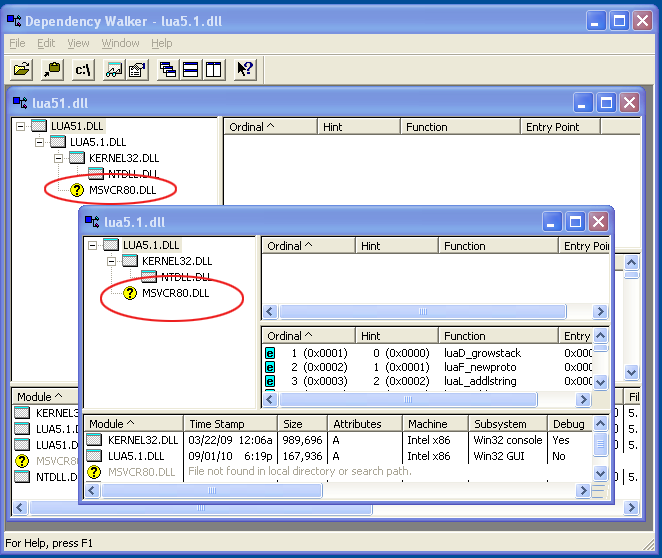
But even if I download and install that, and update luacom.dll to be the one with the new entry point, and assuming that I don't also have to supply other things (an assumption I wouldn't make lightly, see screenshot below), then all existing MUSHclient users who happen to have scripts like the screen-readers that currently work with the existing entry point, would now fail if the DLL was quietly replaced by one with different entry points.

Australia Forum Administrator #17
To be honest, I don't really want to download a 19.6 Mb executable which will install <I don't know what> <I don't know where> to find what the name of an entry point in a DLL is. Sorry.
Amended on Wed 01 Sep 2010 10:59 AM by Nick Gammon
USA #18
I'm not asking ya to... Just, if you please, don't let MC's install break the environment.

I use Lua in a lot of places other than MC; it is in my home domain's login scripts, maintenance scripts, 'chron' type jobs...

We've already seen that there's something different between the dlls you've compiled and the ones that LfW has distributed, like the Lua 5.1 syntax actually working with theirs.

LfW is Lua precompiled into a binary (lua.exe, luac.exe), 43 libraries, samples, documentation, and SciTE in one package. It's not much different in bandwidth than DLing MC and Crimson Editor and a few random Libraries that you might want... Except you don't have to go hunting for the library's website.


I'd suggest that if a library is important enough to distribute, like lpeg; compile it into the exe like lpeg. If you're just trying to set up a 'batteries included' environment, someone already did that for you.

http://cid-73890baf188d56e7.photos.live.com/self.aspx/MCForum/luacom.dwi has the profile of my dll, if you're curious and since you can probably make more of it than I can. :)
USA #19
Why would it break the environment? AFAICT, MUSHclient doesn't affect any environment variables, and it's moved away from the registry.

[EDIT] I do agree with compiling these things into MUSHclient itself, though. You can add your loader function to package.preload['library name'], too, so you still have to call require() before you can access the libraries. I prefer package.preload over adding the libraries immediately, because just like the scripts in the lua/ folder, it's opt-in.
Amended on Wed 01 Sep 2010 04:33 PM by Twisol
Australia Forum Administrator #20
WillFa said:

We've already seen that there's something different between the dlls you've compiled and the ones that LfW has distributed, like the Lua 5.1 syntax actually working with theirs.


Huh? What syntax? Can you give an example? I haven't changed the way Lua works except maybe turn off some of the deprecated functions they actually recommend you turn off (via the standard config file).
Australia Forum Administrator #21
WillFa said:

I'm not asking ya to... Just, if you please, don't let MC's install break the environment.

I use Lua in a lot of places other than MC; it is in my home domain's login scripts, maintenance scripts, 'chron' type jobs...


But it shouldn't, right? Your other Lua stuff will find your other DLLs first (wherever you have them, eg. in the Windows system folder).

The way the search paths work, only when you are running MUSHclient, from the MC directory, and choose to use luacom, should it pick up the luacom.dll I supply in the MC directory.

You can confirm it. Download this:

http://www.gammon.com.au/files/mushclient/lua5.1_extras/luacom.zip (90 Kb, not 20 Mb cough cough).

Put it in the MC install directory. Then see if all your other stuff still works. I'll be surprised if it doesn't. If it stops working, delete that DLL and you are back to how everything was.

I mean, honestly, it shouldn't be in the power of an application to stop all your other apps from working, particularly if you, as I do, localize installs to a single directory (and subdirectories). It might be different if MC shoved DLLs all over the shop, like into the Windows directories, but it doesn't do that.
Australia Forum Administrator #22
WillFa said:

LfW is Lua precompiled into a binary (lua.exe, luac.exe), 43 libraries, samples, documentation, and SciTE in one package. It's not much different in bandwidth than DLing MC and Crimson Editor and a few random Libraries that you might want... Except you don't have to go hunting for the library's website.


I just don't like the idea of having to tell people to do a 20 Mb download (Lua for Windows) to add a small bit of extra functionality to a 3 Mb downloaded program (MUSHclient).
USA #23
Nick Gammon said:

WillFa said:

We've already seen that there's something different between the dlls you've compiled and the ones that LfW has distributed, like the Lua 5.1 syntax actually working with theirs.


Huh? What syntax? Can you give an example? I haven't changed the way Lua works except maybe turn off some of the deprecated functions they actually recommend you turn off (via the standard config file).


require "luacom"


It fails for you and Twisol; works just dandy for me.

I can require() 95% of the included libs distributed with LfW fine (and just that one funky one I asked about last year fails).


I guess I'm thinking that of all the libs to distribute, I'm wondering about a funky version of LuaCom. (btw, your version is 204,800 bytes. LfW's is 172,032 bytes.)

Lpeg? Definitely.
LuaCURL or LuaSocket? Yup I can see them being included.
A LuaCom distro that behaves weirdly? When you've always maintained that you want MC to run fine under WINE and Parallels (No real COM support)? Just seems weird.

In all of MC's history it hasn't really been needed, and the only reason it's come up now is because one person wanted a plugin ported from one language to another (I suspect the same flakiness he saw in the VB implementation will appear with Lua using the same COM interfaces.)


And you don't have to tell them to get LfW. Luaforge or LuaRocks can get them libs as well. There's multiple ways to get them...
Australia Forum Administrator #24
WillFa said:

require "luacom"


It fails for you and Twisol; works just dandy for me.


That's not a syntax error. It is correctly reporting that the entry point does not exist in the DLL.
USA #25
So that syntax doesn't work...
It's not supported syntax...
It's lexically correct, but your module doesn't support it.
Pedantic... sorry. moving on.


Depends shows that your version has a missing 'required implicit or forwarded dependency' on my system. There's an unresolved link to MSVCR80.dll.

It has 4 exports, LfW's has 7, including luaopen_luacom, which is probably what require is looking for.

Amended on Wed 01 Sep 2010 11:26 PM by WillFa
Australia Forum Administrator #26
Well based on the advice from you guys, I have modified my approach.

  • Luacom is now compiled into MUSHclient, so the issue of clashing DLLs goes away.
  • LuaSocket is not, however as the relevant DLLs (core.dll and core.dll - sigh) are in a subdirectory they are unlikely to clash with your stuff.
  • You need to require "luacom" based on Twisol's suggestion of using package.preload. This stops any possible overhead or difficulty under Wine/Parallels, because nothing will happen if you don't "require" it.
  • My tests show it works more reliably than the earlier DLL anyway.


The documentation is supplied in the distribution, plus the file luacom5.lua which adds extra functionality if you want to require that as well.

The executable is only about 90 Kb larger, and that includes the other enhancements in this version as well.
USA #27
Nick Gammon said:

LuaCOM is now included in version 4.60 onwards of MUSHclient. So you can just use it without downloading any files. For example:


-- load Lua COM
com = require "luacom"
  
-- Instantiate a SAPI voice object
talk = assert (luacom.CreateObject ("SAPI.SpVoice"), "cannot open SAPI")
  
-- Method call
talk:Speak ("SAPI installed and is ready.", 1)


Amended so you just need to require "luacom", which is now built into the MUSHclient executable.


Your example here sets 'com' from the require call but never uses it. It doesn't affect anything, but it does look odd.
Australia Forum Administrator #28
Sigh. That's what happens when you keep changing things. I fixed up that post.
Australia Forum Administrator #29
Just to help people get a bit more out of COM, I tried to interface with iTunes using it. This is my preliminary test:


require "luacom"

itunes = assert (luacom.CreateObject ("iTunes.Application"))

-- print version
print (itunes.Version)  --> 10.0.0.68

-- get the library
library = itunes.LibraryPlayList

-- get tracks from library
trackslist = library.Tracks

-- get count of tracks
n = trackslist.Count

print ("Number of tracks =", n)

-- enumerate each track
tracks = luacom.GetEnumerator (trackslist)

-- get first one
track = tracks:Next ()

-- play first track
track:Play ()

-- print all track names
while track do
  print (track.Name)
  track = tracks:Next ()
end -- while


Afterwards, and I'm not sure where you would put this, if anywhere, you can dispose of the COM object:


-- stop using it
itunes = nil
collectgarbage ( )

Australia Forum Administrator #30
If you want to find more about the "type library" you can do this:


require "luacom"  -- built into MUSHclient
require "luacom5" -- supplied as luacom5.lua

-- grab raw type library
rawtlb = luacom.LoadTypeLibrary("itunes.Application")

assert (rawtlb, "Type library not found")

-- convert to table
tlb = luacomE.FillTypeLib(rawtlb)  
rawtlb = nil

require "tprint"
tprint (tlb)  --> 17,982 lines ouptput


Example of some of the output:


    71:
      "helpcontext"=0
      "type"="void"
      "description"="True if playback position is remembered."
      "prototype"="void RememberBookmark(VARIANT_BOOL p1)"
      "parameters":
        1:
          "in"=true
          "type"="VARIANT_BOOL"
          "name"="p1"
          "out"=false
          "opt"=false
      "name"="RememberBookmark"
      "num_params"=1
      "dispid"=1610874884
      "rawMethod":
        "helpcontext"=0
        "type"="void"
        "description"="True if playback position is remembered."
        "invkind"="propput"
        "memid"=1610874884
        "name"="RememberBookmark"
        "parameters"=table: 01A75228
        "ParamsOpt"=0
        "helpfile"=""
        "Params"=1
      "typeinv"="propput"


Or you can get a rather nifty HTML document like this:


require "luacom"  -- built into MUSHclient
require "luacom5" -- supplied as luacom5.lua

luacom.DumpTypeLib ("itunes.Application", "c:\\itunes_typelib.html")


(Lengthy file appears in the nominated location). Opening that with your web browser reveals stuff like this:

Quote:

  • Rewind

    void Rewind()

    Skip backwards in a playing track.

    LuaCOM examples:

    com_obj:Rewind()


Amended on Fri 03 Sep 2010 01:20 AM by Nick Gammon
USA #31
Hello. MC looks to have come along nicely since the last time I used it. I have a question about COM objects in MC and was hoping I might get a little help with a couple of questions.

First I can get info from the program I have the object set up for, like the version of the program, printed to the screen of MC, so that part is ok. Some information that I am trying to view from the object however comes out like this:
table: 05E35C40

Can anyone offer some insight on where I need to go from here to turn that table reference into usable information?

Second I'm a bit confused about what ProgID or ClassID I need to use if I want to set up a COM object for MC to use with another program, if that is possible?

I'm a bit rusty with LUA in general, so try to keep that in mind and maybe dumb responses down a little if anyone has time to reply.
Amended on Mon 11 Oct 2010 11:34 PM by FenceWalker
Netherlands #32
You'll want to look into Nick's tprint function. Basically, do this:

require "tprint"
tprint(table_of_interest)


Regarding the COM object server functionality.. I am not sure that is possible. I've tried something like that once while trying to abuse the MUSHclient world object, and that basically was a big world of 'let us crash MUSHclient' since MUSHclient is not made to have its own object used outside its own process. (Technically, one probably could consider it a bug, but I think very few people know how to fix it or even need it.)
Amended on Tue 12 Oct 2010 12:50 AM by Worstje
Australia Forum Administrator #33
FenceWalker said:

Can anyone offer some insight on where I need to go from here to turn that table reference into usable information?


It might be easier to answer if you gave a specific example. COM can be obscure at the best of times. But if you say something like "I want to play song 3 in my iTunes list", or "I want to get data from Cell A13 in Excel" then that gives us something to get our teeth into.
USA #34
Yeah I guess I was a bit non descriptive, sorry. Here is the full picture. I am trying to get the values of variables from within CMUD. *gasp* Hehe, specifically I would like to use MC and CMUD together. I have alot of scripts written in in zscript already, but there are plugins for MUSHclient that I would like to use aswell. My idea is if I could get MUSHclient to draw the info from the variables I have populated in CMUD directly I could have the best of both worlds. :)

I am using the folowing:
require("luacom")
require "tprint"
local data = 1

cmud = nil
cmuds = nil
var = nil

if data > 0 then
  cmud = luacom.CreateObject("cMUD.Application")
  cmuds = cmud.CurrentSession
  var = cmuds.getvar(test,"\test")
  data = 0
end

print(var)
tprint(var)


which spits out this:
table: 03E39D88
"_USERDATA_REF_"=userdata: 03E3B330


The variable test actually contains a string of:
This is a test

I would ideally like to have the actual contents of the test variable echoed to MUSHclient be it a string, string list or database variable.
Australia Forum Administrator #35
Sorry I was a bit slow to respond - got a bit distracted by the mapper.

The easiest thing might be to do what some others have done, and just get at the Access database which I believe Cmud uses. There was someone recently doing that to grab mapper information.

If that doesn't work, you could try looking at the saved data (I think Cmud uses XML?) which you might be able to parse reasonably simply.

Another thing to try would be to follow the example earlier up this page and try to get the HTML type library from the program, like this:


require "luacom"  -- built into MUSHclient
require "luacom5" -- supplied as luacom5.lua

luacom.DumpTypeLib ("cMUD.Application", "c:\\cmud_typelib.html")


I don't have a copy of cMUD so I can't try that, but you might find from that what your next step would be.
USA #36
Thanks for the help after a couple days of reading and experimentation. I managed to get it working. Adding the line
val = var.value
was needed to actually display what was contained in the variable.


require("luacom")
require("luacom5")

local data = 1

if data == 1 then
  cmud = luacom.CreateObject("cMUD.Application")
  cmuds = cmud.CurrentSession
  var = cmuds.getvar(MSDP,"MSDP")
  val = var.value
  end

print(val)
Amended on Fri 15 Oct 2010 04:30 PM by FenceWalker
Australia Forum Administrator #37
Cool. Now you have a method of getting at all your data.