Appending and updating text at the end of a line

Posted by Zypher on Sun 09 Nov 2014 01:02 PM — 6 posts, 24,069 views.

#0
Hi!

I am trying to add some information (colored strings) at the end of each line in the output window, that is, after the 80 character mark. This information might need to be updated for the newest line, so I can't just replace incoming lines (which might also lead to problems with triggers and line breaks?). And there doesn't seem to be a way to replace text in the output window after the fact.

My idea was to create a miniwindow on the right side of the output window and writing my info there, aligned with the lines from the output. The problem is, that I cannot find a callback when the scroll state of the output window changes (I'd have to update my miniwindow accordingly).
I currently see only two possibilities:
  • checking the scroll state every 0.1 seconds with GetInfo() and updating the miniwindow -> "slow" updates, doesn't look nice
  • creating a miniwindow on top of the output and adding a scroll handler, replacing the default scroll behaviour -> no longer possible to select text in the output, since the miniwindow takes up all the mouse events


Is there anything I might have overlooked?
Thanks in advance :)
Australia Forum Administrator #1
This seems like a reasonable request, although I am having trouble visualizing exactly how it would be used in practice.

However I can see that being able to update miniwindows in response to the current scroll position in the output window could be handy.

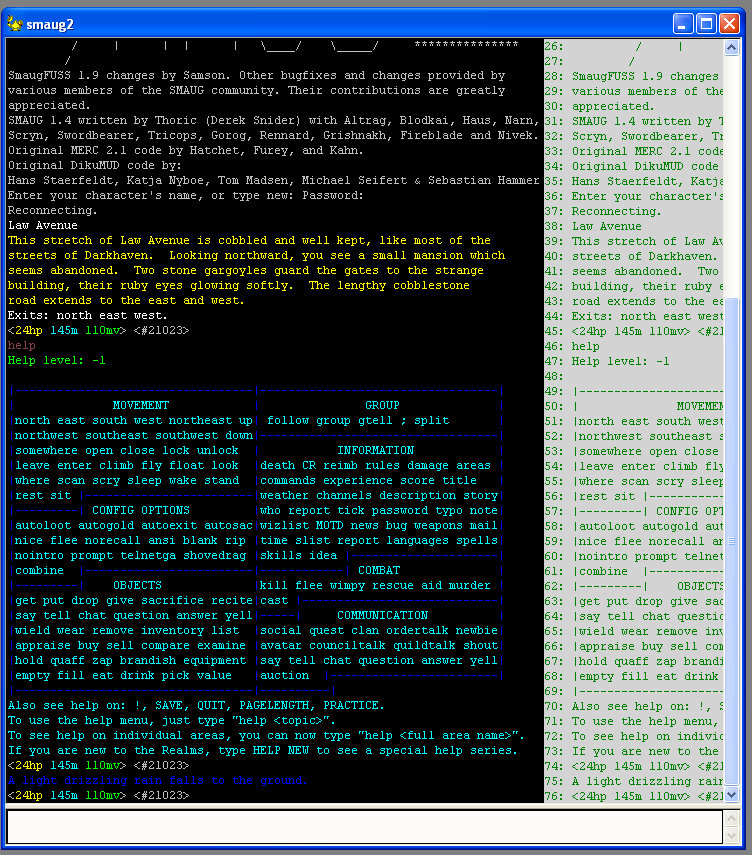
I've added a new callback in version 4.96, called just when the output window is being drawn. This lets you update a miniwindow which you have positioned appropriately. Example output:


I have an example plugin:


<?xml version="1.0" encoding="iso-8859-1"?>
<!DOCTYPE muclient>

<muclient>
<plugin
   name="OnPluginDrawOutputWindow_test"
   author="Nick Gammon"
   id="53fa0d56e81938a116e851e7"
   language="Lua"
   purpose="Testing OnPluginDrawOutputWindow"
   date_written="2014-11-10 06:45:43"
   requires="4.96"
   version="1.0"
   >
<description trim="y">
<![CDATA[
Draws extra stuff, per line, over the output window
]]>
</description>

</plugin>

<!--  Script  -->

<script>
<![CDATA[

function OnPluginWorldOutputResized ()
  main_height = GetInfo (263)
  main_width = GetInfo (264)
  win = "Overlay_" .. GetPluginID ()  -- get a unique name, ensure not empty if outside plugin
  WindowCreate (win, main_width - panel_width, 0, panel_width, main_height, 0, miniwin.create_absolute_location, background_colour)  -- create window
  WindowShow (win,  true)  -- show it 
  WindowFont (win, "f", "Courier New", 9) -- define font
  -- find height of font for future calculations             
  font_height = WindowFontInfo (win, font, 1)  -- height

end -- OnPluginWorldOutputResized

function OnPluginDrawOutputWindow (firstline, offset)
  local font_height = GetInfo (212)
  local text_colour = ColourNameToRGB ("green")

  -- clear window  
  WindowRectOp (win, miniwin.rect_fill, 0, 0, -1, -1, background_colour)

  -- allow for scrolling position
  local top =  (((firstline - 1) * font_height) - offset) - 2

  local lastline = firstline + (main_height / font_height)
  
  for line = firstline, lastline do
    if line >= 1 and GetLineInfo (line, 1) then
      WindowText (win, font, line .. ": " .. GetLineInfo (line, 1), 0, top, 0, 0, text_colour)
      top = top + font_height  
    end -- if line exists
  end -- for each line
  
end -- OnPluginDrawOutputWindow

function OnPluginInstall ()
  panel_width = 200
  background_colour = ColourNameToRGB("lightgray")
  font = "f"
  OnPluginWorldOutputResized ()
end -- OnPluginInstall

]]>
</script>

</muclient>


Be warned, it appears that if you attempt to do a WindowCreate inside OnPluginDrawOutputWindow it causes the client to behave strangely. This is probably because it is creating a device context during window updating. I have worked around this by creating the window initially (OnPluginInstall) and then recreating it if the window is resized (OnPluginWorldOutputResized).

You are passed the first line number which is being drawn (which I use to call GetLineInfo). You can work out the last line by calculating how many lines must be visible. The mucking around with the top pixel here:


  local top =  ((firstline * GetInfo (212)) - offset) - GetInfo (212) - 1


... is necessary because moving the scroll thumb can make the line scroll in sub-line intervals.

You could conceivably use this same concept to add things like floating balloons or information windows, which draw (and scroll) relative to lines in the output window. The plugin isn't bulletproof, for example change:


  WindowFont (win, "f", "Courier New", 9) -- define font


... to get the actual output font and font size, to match that used in the output window (if desired).
Amended on Mon 10 Nov 2014 08:09 AM by Nick Gammon
#2
Hello Nick,
thank you for the reply and all the work you're doing on Mushclient.

I created a prototype of what I am trying to achieve using OnPluginTick() as updater, which of course is costly. See http://snag.gy/h3a9z.jpg

The idea is to display frequent stat changes on the side, so this information doesn't unnecessarily increase the number of lines in the output window. I'm looking forward to utilize the new callback in 4.96.

Two more questions that came up while writing this:
  • Is there a difference between
    GetInfo(212) - "Output font height" and
    GetInfo(241) - "The height, in pixels, of a character in the output window, in the current output font."?
  • Is there any way to get the output font size? I can get the font family via GetInfo(20), but none of the font-related Info fields seem to contain the actual point size, as used by WindowFont
Amended on Mon 10 Nov 2014 07:21 PM by Nick Gammon
USA Global Moderator #3
Zypher said:

I created a prototype of what I am trying to achieve using OnPluginTick() as updater, which of course is costly.

Is it? Ticks don't actually happen if the client is doing other work. ( http://www.gammon.com.au/forum/?id=10792 )

Repaint, however, is expensive. Which is why I have my own special delayed Repaint.
Amended on Mon 10 Nov 2014 04:29 PM by Fiendish
Australia Forum Administrator #4
Quote:

Is there a difference between
GetInfo(212) - "Output font height" and
GetInfo(241) - "The height, in pixels, of a character in the output window, in the current output font."?


Looking at the source, they are identical. I must have had a brain fade when I put the second one in, it probably sounded like a good idea, and I didn't check if it was already there.

Ditto for 213 and 240.

Quote:

Is there any way to get the output font size? I can get the font family via GetInfo(20), but none of the font-related Info fields seem to contain the actual point size, as used by WindowFont


Most (almost all) of the world configuration options can be obtained from GetOption or GetAlphaOption. The names match what is used in the world file XML.


size = GetOption ("output_font_height")


Quote:

Repaint, however, is expensive. Which is why I have my own special delayed Repaint.


However lines are always repainted when more text arrives.

Quote:

I created a prototype of what I am trying to achieve using OnPluginTick() as updater, which of course is costly. See http://snag.gy/h3a9z.jpg


I trust you can work those numbers out from the individual lines. If not you'll have to maintain some sort of array keyed by line number and pull the data in from that. The "actual line number" would be unique per session.

As Fiendish says, though, this won't necessarily be faster, but it should scroll smoothly. And I suppose it is faster if no text arrives, because then the screen doesn't have to be redrawn. Not that "being faster" would matter in that case.
Amended on Mon 10 Nov 2014 07:32 PM by Nick Gammon
Australia Forum Administrator #5
I quite like what you are attempting to do. It is a bit like the "scrolling combat text" from World of Warcraft.