Making a script to count mobs killed

Posted by Nick Gammon on Tue 08 Jan 2008 04:55 AM — 32 posts, 167,155 views.

Australia Forum Administrator #0

This tutorial will show, with screen captures, the general process involved in making a script to count something useful (like the number of times you have killed various mobs), and how to turn that into a plugin.

We will start by getting an example message up from the MUD, and then Shift+Double-click to select the entire line:

Copying message

It is best to copy an actual message so we get the spelling right, and the spacing. The next thing to do is make a trigger that matches this message, so we press Alt+Enter to enter world configuration, and select the Trigger section, and click Add to make a new trigger:
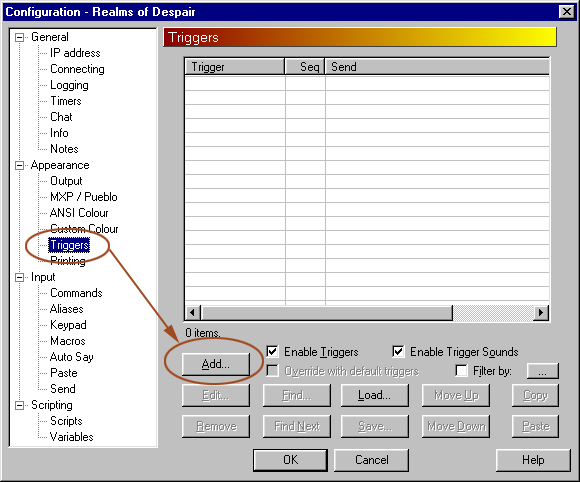
Add a trigger

Now we paste in the death message as the trigger match field:
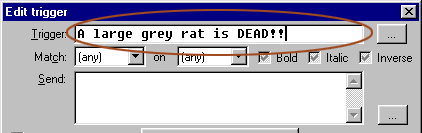
Trigger text

However the mob name will vary, so we need to replace its name with an asterisk, to make it a wildcard. Then to make sure we see it matching I changed the colour to Custom2, and the "send to" field to "Script". Finally we click on the little button that lets us edit the script in the "Send" box:
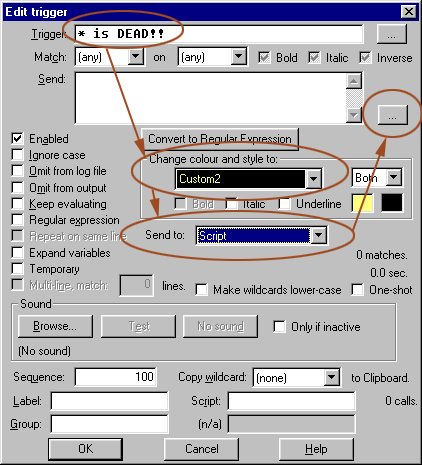
Make a wildcard

Inside the send text, a small Lua script is used to count the number of mobs we have seen killed. The first line makes the table "killed_mobs" if it doesn't already exist. Then we add this mob to the table, if it isn't there already. After that we add 1 to the count, and make a note of the time it was killed.:
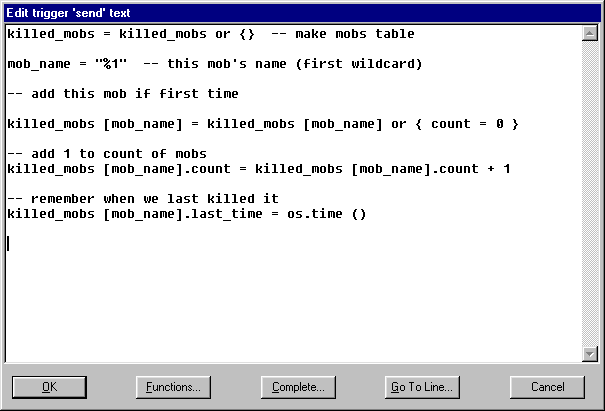
Trigger script

If you want to copy and paste the code, here it is in text form:


killed_mobs = killed_mobs or {}  -- make mobs table

mob_name = "%1"  -- this mob's name (first wildcard)

-- add this mob if first time

killed_mobs [mob_name] = killed_mobs [mob_name] or { count = 0 }

-- add 1 to count of mobs
killed_mobs [mob_name].count = killed_mobs [mob_name].count + 1

-- remember when we last killed it
killed_mobs [mob_name].last_time = os.time ()


Next, to test it we kill a few mobs, and see if the script is working. First we should see the "death" line in yellow, as that shows the trigger has matched. To see if the Lua table is being built correctly I make sure that the scripting prefix is a slash (and to help with error messages I checked "note errors"):
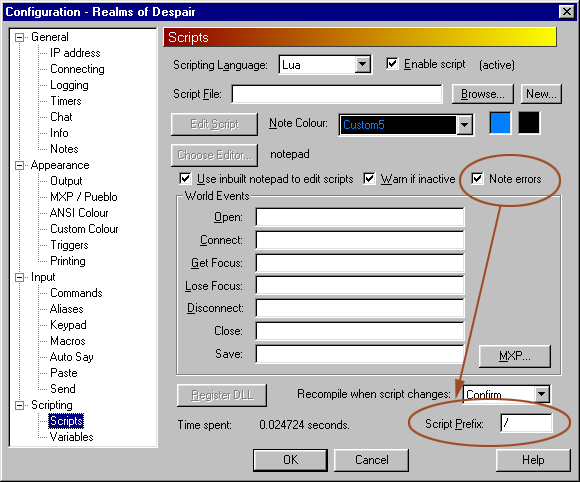
Scripting configuration

Now we can use a slash as a script prefix to load the "tprint" module:
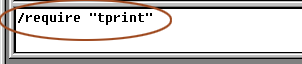
Require tprint

With tprint (table print) loaded we can use it to print the killed_mobs table:
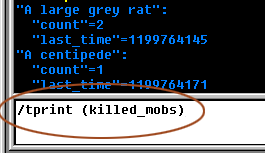
Show mobs table

So far, so good. The table is showing the mobs I killed, how many times, and when. Let's make an alias to display the information neatly. First go into world configuration and add an alias:
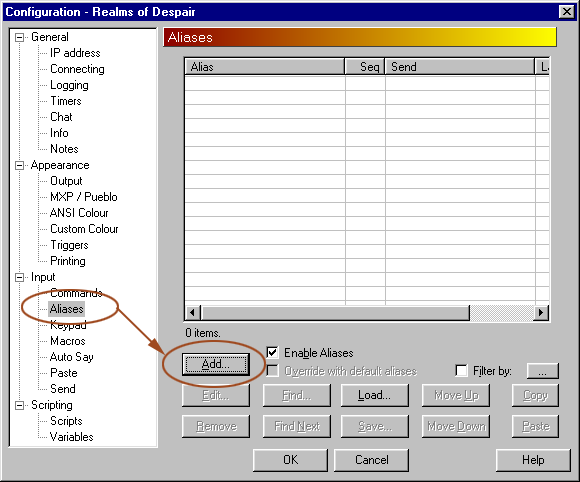
Add an alias

I will make up a name for it (show_killed) but you can call it anything you like. It will call a script so I change the "send to" field to "script" (like for the trigger) and click the button to edit the script field:
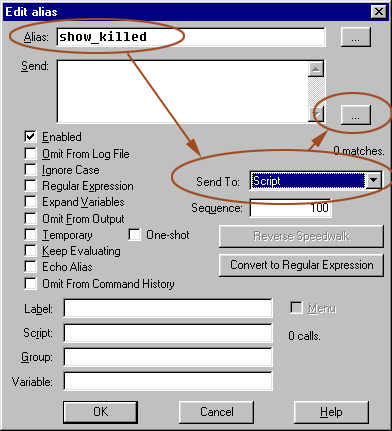
Edit alias

Now we make a small script that goes through each entry in the table, and lists the mob name, count and date formatted nicely:
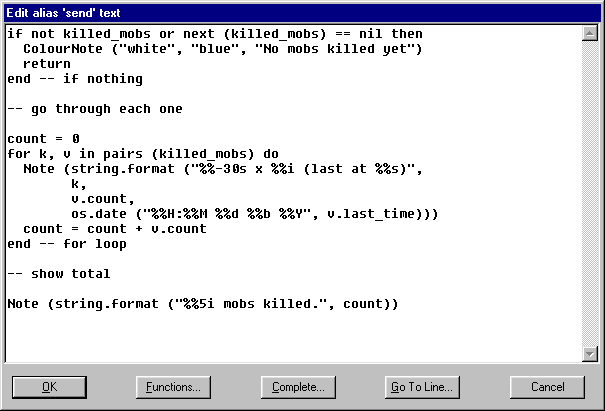
Alias script

If you want to copy and paste the code, here it is in text form:


if not killed_mobs or next (killed_mobs) == nil then
  ColourNote ("white", "blue", "No mobs killed yet")
  return
end -- if nothing

-- go through each one

count = 0
for k, v in pairs (killed_mobs) do
  Note (string.format ("%%-30s x %%i (last at %%s)",
        k, 
        v.count,
        os.date ("%%H:%%M %%d %%b %%Y", v.last_time)))
  count = count + v.count
end -- for loop

-- show total

Note (string.format ("%%5i mobs killed.", count))


I have doubled the number of % symbols used in string.format and os.date because in the "send" box MUSHclient tries to treat % followed by something as a wildcard, so you need to use %% for a single % to be sent to the script engine. Once we have got our alias entered we can test it:
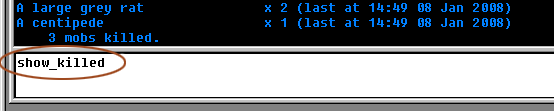
Test the alias

Time to turn it into a plugin. First I use the File menu to start the Plugin Wizard. First we enter the plugin name, purpose, author and required version of MUSHclient:
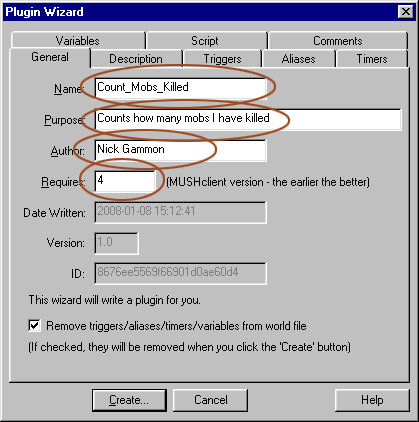
Plugin wizard - general

Next we put in a simple description, in case the player clicks on the "Show Info" button in the plugins list:
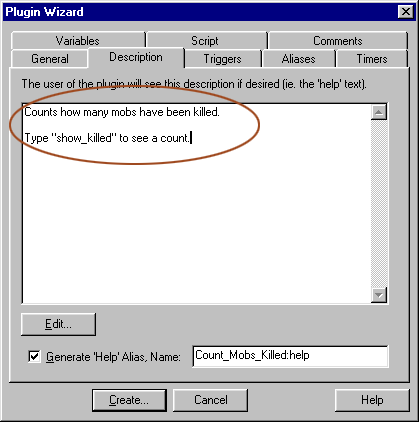
Plugin wizard - description

Next, we move to the Triggers tab. In my case there is only my trigger there, but if you had others you would click "Select None" and then click to select any required triggers:
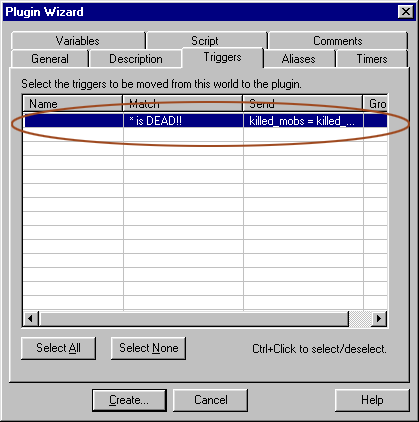
Plugin wizard - triggers

Now, we move to the Aliases tab. In my case there is only my alias there, but if you had others you would click "Select None" and then click to select any required aliases:
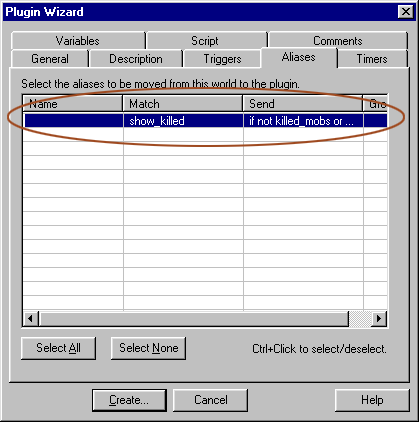
Plugin wizard - aliases

I skipped the Timers tab, as this script does not use timers, and move onto Variables. An important thing to do here is check "Retain State" as this lets the plugin save and restore variables, which is how we remember the mob count from one session to the next:
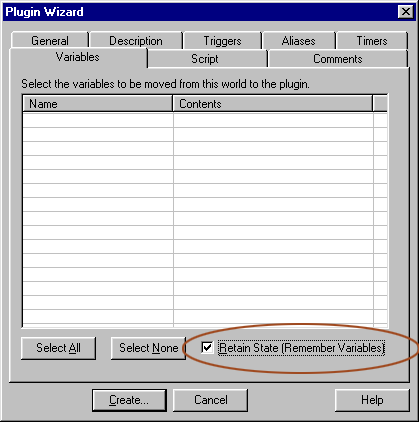
Plugin wizard - variables

Finally we move to the Script tab. I don't use any "standard constants" so "Include Standard Constants" can be unchecked. Then click Edit to add a bit more scripting:
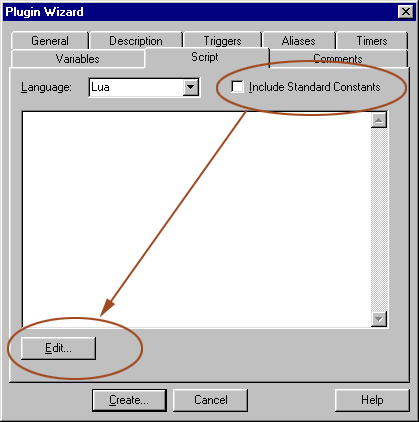
Plugin wizard - script

What we need to do now is add two functions: OnPluginInstall and OnPluginSaveState. The first is called when the plugin is loaded, the second when the plugin is saving its state file. We "require" the Serialize module, which is a helper module for saving the plugin's variables as a string. Then we make an empty killed_mobs table, in case this is the first time the plugin is run. Finally we use loadstring to convert any variables serialized earlier into the Lua table. At plugin save time we use serialize.save_simple to convert the Lua table back into a string:
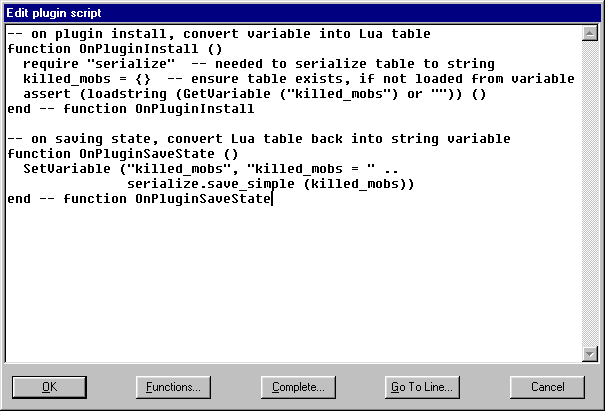
Edit plugin script

If you want to copy and paste the code, here it is in text form:


-- on plugin install, convert variable into Lua table
function OnPluginInstall ()
  require "serialize"  -- needed to serialize table to string
  killed_mobs = {}  -- ensure table exists, if not loaded from variable
  assert (loadstring (GetVariable ("killed_mobs") or "")) ()
end -- function OnPluginInstall

-- on saving state, convert Lua table back into string variable
function OnPluginSaveState ()
  SetVariable ("killed_mobs", "killed_mobs = " ..
               serialize.save_simple (killed_mobs))
end -- function OnPluginSaveState


If you check out the state file (double-click the RH mouse button on the plugin name in the plugins list) after using the plugin you will see something like this:


<?xml version="1.0" encoding="iso-8859-1"?>
<!DOCTYPE muclient>
<!-- Saved on Tuesday, January 08, 2008, 3:42  -->
<!-- MuClient version 4.20 -->
<!-- Written by Nick Gammon -->
<!-- Home Page: http://www.mushclient.com/ -->

<!-- Plugin state saved. Plugin: "Count_Mobs_Killed". World: "Realms of Depair". -->

<muclient>

<!-- variables -->

<variables
   muclient_version="4.20"
   world_file_version="15"
   date_saved="2008-01-08 15:42:07"
  >
  <variable name="killed_mobs">killed_mobs = {
  ["A large grey rat"] = {
    count = 1,
    last_time = 1199767236,
    },
  ["A Fire Ant"] = {
    count = 1,
    last_time = 1199767275,
    },
  }</variable>
</variables>
</muclient>


Now we can hit the Create button to make our new plugin:
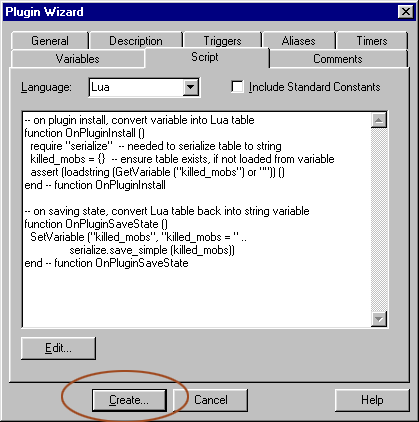
Create plugin

We can accept the suggested name for the plugin:
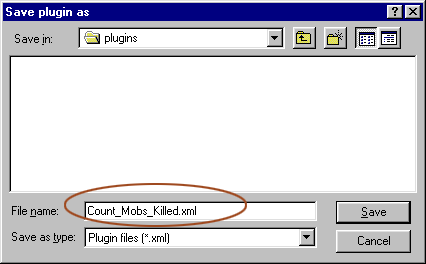
Plugin name

Now to test it! Go to the File Menu, select Plugins, and you will see something like this:
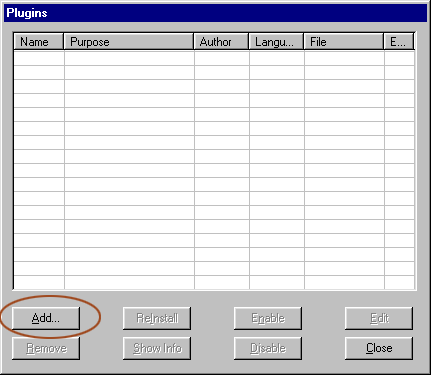
Plugin list

Choose our newly created plugin file:
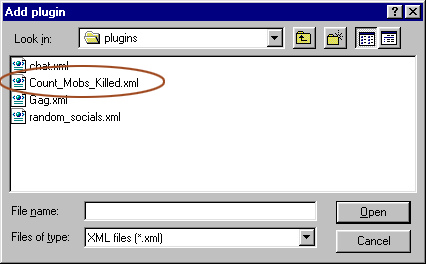
Choose plugin

It now appears in the list of plugins:
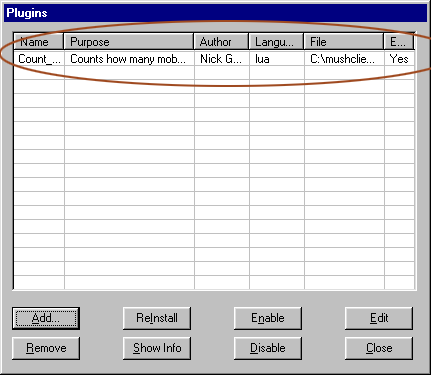
Plugin list with new plugin

We can now type "show_killed" - this time it should report "No mobs killed yet" because each plugin has its own script space, separate from the main world script space. However we can soon kill a few more mobs and the show_killed alias should now work. Also we can close and re-open the world and it will remember the mobs we killed last time, thanks to the script to save and restore the killed_mobs table.

Australia Forum Administrator #1
Below is how the entire plugin looks, if you edit the plugin file.

Template:saveplugin=Count_Mobs_Killed
To save and install the Count_Mobs_Killed plugin do this:
  1. Copy the code below (in the code box) to the Clipboard
  2. Open a text editor (such as Notepad) and paste the plugin code into it
  3. Save to disk on your PC, preferably in your plugins directory, as Count_Mobs_Killed.xml
    • The "plugins" directory is usually under the "worlds" directory inside where you installed MUSHclient.
  4. Go to the MUSHclient File menu -> Plugins
  5. Click "Add"
  6. Choose the file Count_Mobs_Killed.xml (which you just saved in step 3) as a plugin
  7. Click "Close"
  8. Save your world file, so that the plugin loads next time you open it.


<?xml version="1.0" encoding="iso-8859-1"?>
<!DOCTYPE muclient>
<!-- Saved on Tuesday, January 08, 2008, 3:26  -->
<!-- MuClient version 4.20 -->

<!-- Plugin "Count_Mobs_Killed" generated by Plugin Wizard -->

<muclient>
<plugin
   name="Count_Mobs_Killed"
   author="Nick Gammon"
   id="f11e3bb0e48d526152798439"
   language="Lua"
   purpose="Counts how many mobs I have killed"
   save_state="y"
   date_written="2008-01-08 15:17:18"
   requires="4.00"
   version="1.0"
   >
<description trim="y">
<![CDATA[
Counts how many mobs have been killed.

Type "show_killed" to see a count.
]]>
</description>

</plugin>


<!--  Triggers  -->

<triggers>
  <trigger
   custom_colour="2"
   enabled="y"
   match="* is DEAD!!"
   send_to="12"
   sequence="100"
  >
  <send>killed_mobs = killed_mobs or {}  -- make mobs table

mob_name = "%1"  -- this mob's name (first wildcard)

-- add this mob if first time

killed_mobs [mob_name] = killed_mobs [mob_name] or { count = 0 }

-- add 1 to count of mobs
killed_mobs [mob_name].count = killed_mobs [mob_name].count + 1

-- remember when we last killed it
killed_mobs [mob_name].last_time = os.time ()

</send>
  </trigger>
</triggers>

<!--  Aliases  -->

<aliases>
  <alias
   match="show_killed"
   enabled="y"
   send_to="12"
   sequence="100"
  >
  <send>if not killed_mobs or next (killed_mobs) == nil then
  ColourNote ("white", "blue", "No mobs killed yet")
  return
end -- if nothing

-- go through each one

count = 0
for k, v in pairs (killed_mobs) do
  Note (string.format ("%%-30s x %%i (last at %%s)",
        k, 
        v.count,
        os.date ("%%H:%%M %%d %%b %%Y", v.last_time)))
  count = count + v.count
end -- for loop

-- show total

Note (string.format ("%%5i mobs killed.", count))</send>
  </alias>
</aliases>

<!--  Script  -->


<script>
<![CDATA[

-- on plugin install, convert variable into Lua table
function OnPluginInstall ()
  require "serialize"  -- needed to serialize table to string
  killed_mobs = {}  -- ensure table exists, if not loaded from variable
  assert (loadstring (GetVariable ("killed_mobs") or "")) ()
end -- function OnPluginInstall

-- on saving state, convert Lua table back into string variable
function OnPluginSaveState ()
  SetVariable ("killed_mobs", "killed_mobs = " ..
               serialize.save_simple (killed_mobs))
end -- function OnPluginSaveState
]]>
</script>


<!--  Plugin help  -->

<aliases>
  <alias
   script="OnHelp"
   match="Count_Mobs_Killed:help"
   enabled="y"
  >
  </alias>
</aliases>

<script>
<![CDATA[
function OnHelp ()
  world.Note (world.GetPluginInfo (world.GetPluginID (), 3))
end
]]>
</script> 

</muclient>


You can see that the trigger and alias are near the top, and the script stuff follows.
Amended on Wed 19 Aug 2009 03:54 AM by Nick Gammon
#2
So here's a question...

How do you add to that count?

Like say, add 50 lizards to the kill count, that you haven't killed, without spamming?
Australia Forum Administrator #3
Add another alias to the plugin. For example, just before the line with "<!-- Script -->" in it, paste this:


<aliases>
  <alias
   match="^killed (-?\d+) (.*)$"
   enabled="y"
   regexp="y"
   send_to="12"
   sequence="100"
  >
  <send>

killed_mobs = killed_mobs or {}  -- make mobs table

mob_name = "%2"  -- this mob's name (second wildcard)

-- add this mob if first time

killed_mobs [mob_name] = killed_mobs [mob_name] or { count = 0 }

-- add to count of mobs (first wildcard)
killed_mobs [mob_name].count = killed_mobs [mob_name].count + %1

-- remember when we last killed it
killed_mobs [mob_name].last_time = os.time ()

Note (string.format ('Added kill of %1 x "%2" to mob count (total now %%d).',
      killed_mobs [mob_name].count))

</send>
  </alias>
</aliases>


Now you type "killed <count> <mobname>", like this:


killed 20 kobold
Added kill of 10 x "kobold" to mob count (total now 30).


You need to get the spelling and capitalization exactly right, or it will add a different mob to the table. (eg. if you said "killed 20 kobolds" it would add it under "kobolds" not "kobold").

If you make a mistake, you can use a negative number, eg.


killed -20 kobold
Added kill of -20 x "kobold" to mob count (total now 10).

Amended on Sun 25 Jan 2009 07:48 PM by Nick Gammon
#4
Awesome help, thank you!

Definitely recommend this counter script to everyone. Really easy to customize and use for ANYTHING you can think of.
USA #5
Mostly what im trying to do is just get my toes wet with scripting in general... and after looking around i figured this thread was a decent place to start. But im more interested in tracking how often skills hit/miss. than number of kills/time

I had some success when i first started playing around with it. But after closing the window and reopening it. I started getting errors. Below are the 2 triggers im playing around with, and the error message.

Run-time error
World: Erehwonmai
Immediate execution
[string "Trigger: "]:7: attempt to perform arithmetic on field 'miss' (a nil value)
stack traceback:
[string "Trigger: "]:7: in main chunk

<triggers>
<trigger
enabled="y"
keep_evaluating="y"
match="([A-Za-z]+) says \'hit\'$"
regexp="y"
send_to="12"
sequence="100"
>
<send>player_stats = player_stats or {}

player_name = "%1"

player_stats [player_name] = player_stats [player_name] or { hit = 0 }

player_stats [player_name].hit = player_stats [player_name].hit + 1</send>
</trigger>
<trigger
enabled="y"
keep_evaluating="y"
match="([A-Za-z]+) says \'miss\'$"
regexp="y"
send_to="12"
sequence="100"
>
<send>player_stats = player_stats or {}

player_name = "%1"

player_stats [player_name] = player_stats [player_name] or { miss = 0 }

player_stats [player_name].miss = player_stats [player_name].miss + 1</send>
</trigger>
</triggers>
Australia Forum Administrator #6
OK, your problem here is, if the first thing that happens is a hit, you set up a default entry for that player.

For example:


Nick says 'hit'

/require "tprint";tprint (player_stats)

"Nick":
  "hit"=1


However you haven't set up miss to be zero, so when you get your first miss, it doesn't create miss = 0, because there is now an entry for Nick.

So for either case, hit or miss, you need to set up both hit and miss to be zero, like this:


<triggers>
  <trigger
   enabled="y"
   keep_evaluating="y"
   match="([A-Za-z]+) says \'hit\'$"
   regexp="y"
   send_to="12"
   sequence="100"
  >
  <send>
player_stats = player_stats or {}

player_name = "%1"

player_stats [player_name] = player_stats [player_name] or 
    { hit = 0, miss = 0 }

player_stats [player_name].hit = player_stats [player_name].hit + 1
</send>
  </trigger>
  <trigger
   enabled="y"
   keep_evaluating="y"
   match="([A-Za-z]+) says \'miss\'$"
   regexp="y"
   send_to="12"
   sequence="100"
  >
  <send>
player_stats = player_stats or {}

player_name = "%1"

player_stats [player_name] = player_stats [player_name] or 
    { hit = 0, miss = 0 }

player_stats [player_name].miss = player_stats [player_name].miss + 1
</send>
  </trigger>
</triggers>


Australia Forum Administrator #7
An alternative way, which is probably more flexible is to do the "or" when adding, that way you don't have to make the table construction handle all the future things you might add. Like this:


<triggers>
  <trigger
   enabled="y"
   keep_evaluating="y"
   match="([A-Za-z]+) says \'hit\'$"
   regexp="y"
   send_to="12"
   sequence="100"
  >
  <send>
player_stats = player_stats or {}

player_name = "%1"

player_stats [player_name] = player_stats [player_name] or {}

player_stats [player_name].hit = (player_stats [player_name].hit or 0) + 1
</send>
  </trigger>
  <trigger
   enabled="y"
   keep_evaluating="y"
   match="([A-Za-z]+) says \'miss\'$"
   regexp="y"
   send_to="12"
   sequence="100"
  >
  <send>
player_stats = player_stats or {}

player_name = "%1"

player_stats [player_name] = player_stats [player_name] or {} 

player_stats [player_name].miss = (player_stats [player_name].miss or 0) + 1
</send>
  </trigger>
</triggers>


Now we simply create an empty table if necessary, and then when adding, do "or 0" to take into account that this might be the first time. The parentheses are necessary to make it evaluate correctly.
Amended on Sat 07 Feb 2009 12:42 AM by Nick Gammon
Australia Forum Administrator #8
And if you want to get fancy, and - hey - why not?, then use a metatable on the player entry, that returns 0 for any missing item. This may or may not be what you really want, but this lets you handle the first zero entry a bit more naturally.


<triggers>
  <trigger
   enabled="y"
   keep_evaluating="y"
   match="([A-Za-z]+) says \'hit\'$"
   regexp="y"
   send_to="12"
   sequence="100"
  >
  <send>

player_stats = player_stats or {}

player_name = "%1"

player_stats [player_name] = player_stats [player_name] or 
              setmetatable ( {}, { __index = function () return 0 end } )

player_stats [player_name].hit = player_stats [player_name].hit + 1

</send>
  </trigger>
  <trigger
   enabled="y"
   keep_evaluating="y"
   match="([A-Za-z]+) says \'miss\'$"
   regexp="y"
   send_to="12"
   sequence="100"
  >
  <send>

player_stats = player_stats or {}

player_name = "%1"

player_stats [player_name] = player_stats [player_name] or 
              setmetatable ( {}, { __index = function () return 0 end } )

player_stats [player_name].miss = player_stats [player_name].miss + 1

</send>
  </trigger>
</triggers>


The metatable here consists of an entry "__index = function () return 0 end".

What that does is, if you attempt to access any missing item in the table, it returns zero. Thus, you can then add to it.

Amended on Sat 07 Feb 2009 12:52 AM by Nick Gammon
USA #9
Nice, not 1, but 3 examples :P Thanks... I'll keep poking around with it, and possibly beg for more help later as i build/expand on it
Amended on Sat 07 Feb 2009 01:15 AM by Chyort
USA #10
Second question, how do i go about making a output alias for this?

I can mostly follow whats going on in the example, but i dont know how to modify it to do what i want it to.

Something like this.


Name        Hit    Miss
Player1     2      2
Player2     2      1
Total       4      3


and the more commented any example might be, the better :P so i can see exactly whats going on/why.
Australia Forum Administrator #11

-- test data

player_stats = {
  Nick = { hit = 5, miss = 10 },
  Chyort  = { hit = 4, miss = 20 },
  Bruce = { hit = 2, miss = 1 },
  Larissa = { hit = 40, miss = 3},
}

-- zero totals
local total_hit, total_miss = 0, 0

-- heading
Note (string.format ("%-15s %5s %5s", "Name", "Hit", "Miss"))

-- so names appear in alphabetic order
require "pairsbykeys"

-- for each player
for name, stats in pairsByKeys (player_stats) do

  -- show stats
  Note (string.format ("%-15s %5d %5d", name, stats.hit, stats.miss))

  -- add to total
  total_hit = total_hit + stats.hit
  total_miss = total_miss + stats.miss
end -- for

-- show totals
Note (string.format ("%-15s %5d %5d", "Total", total_hit, total_miss))


Displays:


Name              Hit  Miss
Bruce               2     1
Chyort              4    20
Larissa            40     3
Nick                5    10
Total              51    34


USA #12
have to double up the %'s but i saw that earlier when i was browsing the forums. thanks again.

now to play around with it a bit. :)
#13
Hmm, I'm a bit different I guess, Keeping track is good, but wouldn't it be nice to be able to use a command to wipe out the data and start over fast? I like to keep a weeks count myself. That way, I can track my progress for a week and know on friday if I need to catch back up.
Australia Forum Administrator #14
Another simple alias should do that:


<aliases>
  <alias
   match="reset_mob_counts"
   enabled="y"
   send_to="12"
   sequence="100"
  >
  <send>

killed_mobs =  {}  -- clear mobs table

</send>
  </alias>
</aliases>


#15
Yes, that works...a bit to well. After I cleared it. It won't record any kills now. Tried restarting the client. Tried recreating it too. No luck.
Australia Forum Administrator #16
I don't see why that would happen, unless you somehow removed something important from the plugin. Is the trigger firing? It needs to, to count kills.
#17
It doesn't appear like it is. Here's what I have.

<?xml version="1.0" encoding="iso-8859-1"?>
<!DOCTYPE muclient>
<!-- Saved on Tuesday, January 08, 2008, 3:26 -->
<!-- MuClient version 4.20 -->

<!-- Plugin "Count_Mobs_Killed" generated by Plugin Wizard -->

<muclient>
<plugin
name="Count_Mobs_Killed"
author="Nick Gammon"
id="f11e3bb0e48d526152798439"
language="Lua"
purpose="Counts how many mobs I have killed"
save_state="y"
date_written="2008-01-08 15:17:18"
requires="4.00"
version="1.0"
>
<description trim="y">
<![CDATA[
Counts how many mobs have been killed.

Type "show_killed" to see a count.
]]>
</description>

</plugin>


<!-- Triggers -->

<triggers>
<trigger
custom_colour="2"
enabled="y"
match="* is DEAD!!"
send_to="12"
sequence="100"
>
<send>killed_mobs = killed_mobs or {} -- make mobs table

mob_name = "%1" -- this mob's name (first wildcard)

-- add this mob if first time

killed_mobs [mob_name] = killed_mobs [mob_name] or { count = 0 }

-- add 1 to count of mobs
killed_mobs [mob_name].count = killed_mobs [mob_name].count + 1

-- remember when we last killed it
killed_mobs [mob_name].last_time = os.time ()

</send>
</trigger>
</triggers>

<!-- Aliases -->

<aliases>
<alias
match="show_killed"
enabled="y"
send_to="12"
sequence="100"
>
<send>if not killed_mobs or next (killed_mobs) == nil then
ColourNote ("white", "blue", "No mobs killed yet")
return
end -- if nothing

-- go through each one

count = 0
for k, v in pairs (killed_mobs) do
Note (string.format ("%%-30s x %%i (last at %%s)",
k,
v.count,
os.date ("%%H:%%M %%d %%b %%Y", v.last_time)))
count = count + v.count
end -- for loop

-- show total

Note (string.format ("%%5i mobs killed.", count))</send>
</alias>
</aliases>

<aliases>
<alias
match="reset_mob_counts"
enabled="y"
send_to="12"
sequence="100"
>
<send>

killed_mobs = {} -- clear mobs table

</send>
</alias>
</aliases>

<!-- Script -->


<script>
<![CDATA[

-- on plugin install, convert variable into Lua table
function OnPluginInstall ()
require "serialize" -- needed to serialize table to string
killed_mobs = {} -- ensure table exists, if not loaded from variable
assert (loadstring (GetVariable ("killed_mobs") or "")) ()
end -- function OnPluginInstall

-- on saving state, convert Lua table back into string variable
function OnPluginSaveState ()
SetVariable ("killed_mobs", "killed_mobs = " ..
serialize.save_simple (killed_mobs))
end -- function OnPluginSaveState
]]>
</script>


<!-- Plugin help -->

<aliases>
<alias
script="OnHelp"
match="Count_Mobs_Killed:help"
enabled="y"
>
</alias>
</aliases>

<script>
<![CDATA[
function OnHelp ()
world.Note (world.GetPluginInfo (world.GetPluginID (), 3))
end
]]>
</script>

</muclient>
Australia Forum Administrator #18
Can you copy and paste some of the MUD output that happens when something dies?
#19
Sure can, It was working just fine before I did the count reset.

Snow crab claws you.
Snow crab pinches you.
You got 1245 xp.
Snow crab died horribly.
Snow crab dies.
Australia Forum Administrator #20
The trigger match is:


match="* is DEAD!!"


There is no way that will match any of what you posted.

You need to change it to:


match="* dies."


#21
GAH! I had forgotten I had changed that. sigh
#22
Hi, I just started to give Triggers, Aliases, etc a try, so I am very much a newbie...

I followed the example and I get the trigger working as well as the "tprint" module. Here is the output for "/tprint (killed_mobs)":

"the wyvern":
"count"=1
"last_time"=function: 00D6FCD8
"the goblin":
"count"=8
"last_time"=function: 00D6FCD8

I follow the example further, but run into problems after I have configured and added the alias. I get the following output for "show_killed"

Run-time error
World: WaterdeepMUD - CharName
Immediate execution
[string "Alias: "]:13: bad argument #2 to 'date' (number expected, got function)
stack traceback:
[C]: in function 'date'
[string "Alias: "]:13: in main chunk

I do not know what is wrong, some thing with the date argument?

Australia Forum Administrator #23
Hmmm - can you post what you did please?

Template:copying
For advice on how to copy aliases, timers or triggers from within MUSHclient, and paste them into a forum message, please see Copying XML.


Quote:

"last_time"=function: 00D6FCD8


Offhand, this looks like are storing a function, not a function result. For example, this might do it:


last_time = os.time


That stores a function, whereas you want:


last_time = os.time ()


Note the brackets.
#24
Hi Nick, thanks for the quick response.

Sorry I jumped into my problem without enough background...

I am following the "Making a script to count mobs killed" example/tutorial that can be found here:


I basically cut and past the code from the website into MC.

As I said before, I get the trigger working as well as activate the "tprint" module. Here is the code:


killed_mobs = killed_mobs or {}  -- make mobs table

mob_name = "%1"  -- this mob's name (first wildcard)

-- add this mob if first time

killed_mobs [mob_name] = killed_mobs [mob_name] or { count = 0 }

-- add 1 to count of mobs
killed_mobs [mob_name].count = killed_mobs [mob_name].count + 1

-- remember when we last killed it
killed_mobs [mob_name].last_time = os.time


And here is the output for "/tprint (killed_mobs)":

Quote:

"the wyvern":
"count"=1
"last_time"=function: 00D6FCD8
"the goblin":
"count"=8
"last_time"=function: 00D6FCD8


So everything up to here works. I follow the example further. But run into problems after I have configured and added the alias. Here is my Alias code:


if not killed_mobs or next (killed_mobs) == nil then
  ColourNote ("white", "blue", "No mobs killed yet")
  return
end -- if nothing

-- go through each one

count = 0
for k, v in pairs (killed_mobs) do
  Note (string.format ("%%-30s x %%i (last at %%s)",
        k, 
        v.count,
        os.date ("%%H:%%M %%d %%b %%Y", v.last_time)))
  count = count + v.count
end -- for loop

-- show total

Note (string.format ("%%5i mobs killed.", count))


With this code I get the following output for "show_killed":

Quote:

Run-time error
World: WaterdeepMUD - CharName
Immediate execution
[string "Alias: "]:13: bad argument #2 to 'date' (number expected, got function)
stack traceback:
[C]: in function 'date'
[string "Alias: "]:13: in main chunk


I hope I have explained my problem a little better. Hmmm, as an after thought, I use Mc through Wine on Ubuntu. My other trigers (Drink water and Show Exits, also from you website works fine).
#25
Dfmalh said:


-- remember when we last killed it
killed_mobs [mob_name].last_time = os.time


os.time should be os.time()

That should do the trick.

Bast
#26
Hi Nick and Bast,

Thanks for pointing the specific "()" problem. I completely missed it in the previous post. I also went back to check the code from where I cut it... and well... all my fault, I missed, or did not select the final two characters, ()

Thanks for your help! Now I will proceed with he rest of the tut.

:-)))
#27
You got 57 xp.
[something]
[something]
Mob Dies.

I've got the following text on output.

What I'm trying to do is incorporate the following information into the Show_killed alias.

I want to keep a running tally of the XP accumulated from each mob type and then divide it by the number of mobs killed to gain an average xp per mob.

But can't as multi-line triggers don't work as I expect.

What are my options?

Australia Forum Administrator #28
Template:faq=37
Please read the MUSHclient FAQ - point 37.


Basically remember the number of xp (the first line). When the mob dies you can record that against the mob name.
#29
There is one bug with this script that I had to encounter when I wrote a similar script in zmud.

The line prior to the kill line tells you who in fact made the kill. For alignment reasons groups are often disbanded just before the kill blow and so this trigger will count a false positive.

It's not critical but for some purposes I'd rather know my true list.

Is there a simple way to have this trigger fire, but then check the first word of the prior line(s) for the word "Your"... as in "Your slash horribly disfigures some-mob\nSome-mob is DEAD!!!"?

Thanks
Australia Forum Administrator #30
A multi-line trigger should do something simple like that.
Australia Forum Administrator #31
Example:


<triggers>
  <trigger
   enabled="y"
   lines_to_match="2"
   match="\AYour slash horribly disfigures (.*)\n\1 is DEAD!!!\Z"
   multi_line="y"
   regexp="y"
   send_to="2"
   sequence="100"
  >
  <send>You killed mob: %1
</send>
  </trigger>
</triggers>


Template:pasting
For advice on how to copy the above, and paste it into MUSHclient, please see Pasting XML.


That trigger assumes the mob name is identical on both lines. Otherwise change the "\1" to just ".*"